How an APRS Packet Travels - From RF to APRS-IS
by Oguz TA4OHN
Ask ten operators how a beacon from a handheld ends up as a moving dot on a website and you will get ten half-answers. Everyone knows the endpoints - a radio on one side, a map on the other - but the middle is a fog of digipeaters, iGates, q-constructs, and servers that no single document ever quite lays out in order.
This guide walks one packet the whole way, in sequence, from the moment somebody keys up to the moment the same data is sitting on a server on the other side of the planet. We will follow a real example throughout, and at the end we will look at the specific iGate mistakes that quietly corrupt the network - the ones that explain why the raw feed is noisier than it should be. No prior APRS knowledge is assumed - if you don't yet know what APRS is, start with What is APRS? and come back.
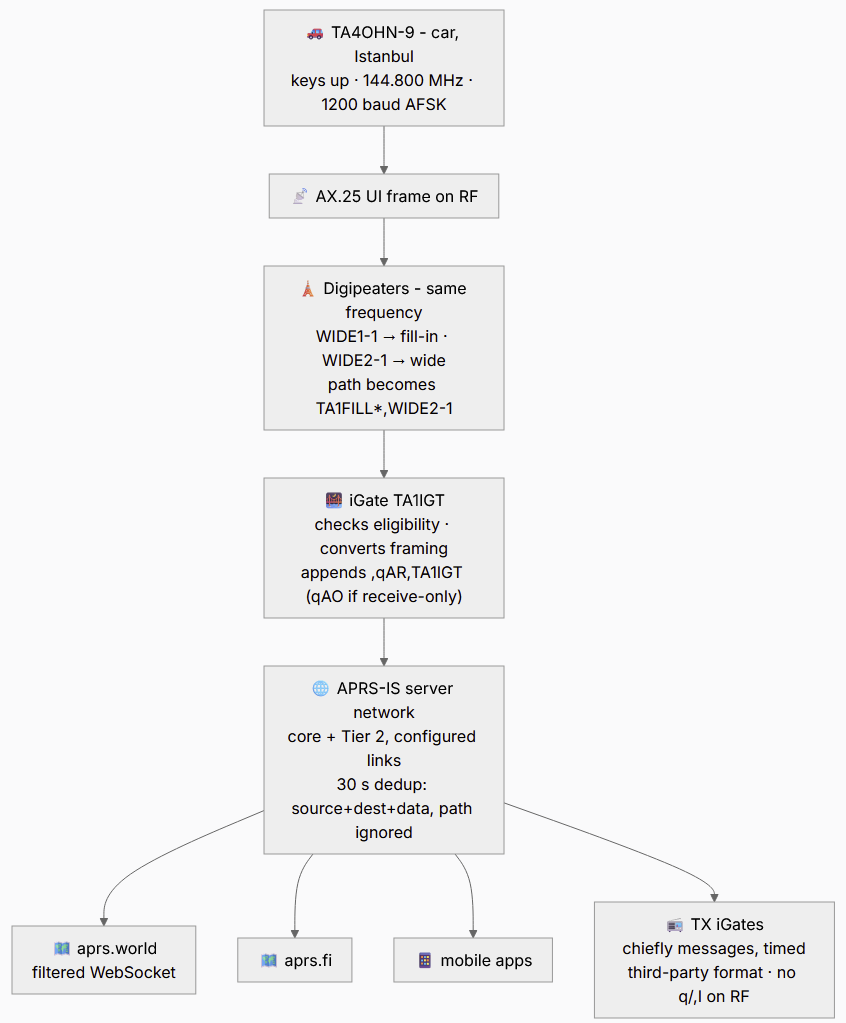
Here is the entire trip:
- 📻TA4OHN-9keys up on 144.800 MHz
- 📡Digipeaterrepeats it across the region (RF)
- 🌉iGatehears it, gates it to the internet
- ☁️APRS-ISworldwide server network
- 🗺️aprs.worldthe dot moves on your screen
~2 seconds in real life.
A radio speaks; nearby repeater-like stations (digipeaters) re-shout it so it carries farther; somewhere a station with both a radio and an internet connection (an iGate) hears it and lifts it onto a worldwide server network (APRS-IS); and from there every map on the planet can draw it. Four hops, two networks, about two seconds.
Our traveller for the day is a mobile station in Istanbul:
TA4OHN-9>APDR16,WIDE1-1,WIDE2-1:!4058.12N/02900.34E>Mobile in Istanbul
That single line is a complete APRS packet in TNC2 monitor format. By the time it reaches a website it will look a little different, and the changes it picks up along the way are the whole story.
Step 0 - Anatomy of the Packet
Before it moves anywhere, it helps to read what the packet actually says. APRS rides on AX.25 UI frames, and the TNC2 text form above maps onto that frame like this:
TA4OHN-9- the source: the transmitting station, SSID-9(a common convention for a car).APDR16- the destination, or "tocall". On APRS this is almost never a real recipient; by convention it is an assigned identifier for the software or device that generated the packet, often including a version.APDR16is APRSdroid; a Kenwood radio might sayAPK004. (Mic-E is the exception - it packs the latitude into this destination field and the longitude, speed, course, and status bits into the information field.)WIDE1-1,WIDE2-1- the digipeater path: a request that fill-in and wide digipeaters repeat this packet, which is how it spreads across RF.:- the delimiter between the address header and the data. It is not part of the information field.!4058.12N/02900.34E>Mobile in Istanbul- the information field itself. The leading!means "position, no timestamp". Then latitude4058.12N, the/symbol table, longitude02900.34E, the>symbol (a car), and a free-text comment.
The same packet, colour-coded - every field lit up with what it means:

If any of that is unfamiliar, the AX.25 protocol guide breaks the frame down field by field. For now, the key point is that the packet is self-describing: who sent it, what made it, how far it should travel, and what it carries.
The Packet Zoo - What Else Travels This Road
Our ! position packet is only one of the shapes APRS traffic takes. The first byte of the information field is the Data Type Identifier, and it tells every parser on the planet what follows. All of the packets below were captured live from the APRS-IS feed while writing this guide - this is what the road actually carries on an ordinary evening:
KK7CXF-2>APDW18,ALAKES,WIDE1*,qAR,MISION:!4533.88N/11755.57WxPHG8000SmokeWood Pi via RF
K6GMW>APRS,TCPIP*,qAC,AMBCWOP-2:@230008z3244.89N/09448.03W_350/001g005t094r000p000h50b10130AmbientCWOP.com
WA8LMF-4>APU25N,TCPIP*,qAC,T2MCI:=/8qo;9/oD/  BSpecial Events Map wa8lmf.ddns.net:14445
KT4LH-10>APDW15,TCPIP*,qAC,T2BC:;HARSPLX  *111111z3823.28N/08417.79Wr 146.535MHz 8:15pm Harrison Simplex Net
WINLINK>APWL2K,TCPIP*,qAS,WLNK-1:;W7AUX-10 *231208z4746.  NW12222.  Wa145.050MHz Winlink Packet Gateway
N2RWE>APMI06,TCPIP*,qAC,T2PR:T#092,189,000,000,000,181,00000000
K0ITP-D>APDG03,qAS,K0ITP:>Powered by WPSD (https://wpsd.radio)
Reading down the list:
!- position, no timestamp.KK7CXF-2is a node in Oregon;PHG8000encodes its power/height/gain. And its path tells a real RF story: a consumed digi hop (WIDE1*) before iGateMISIONgated it (qAR).@- position with timestamp.K6GMWstamps230008z(day 23, 00:08 UTC) and follows with a weather block (t094= 94 °F,b10130= pressure in tenths of millibars). It is part of CWOP, the citizen-weather program whose APRS-carried observations feed real forecast models.=- position with messaging capability. Look atWA8LMF-4's payload:/8qo;9/oD/is not line noise and not Mic-E - it is the third position encoding, base-91 compressed, packing latitude and longitude into a handful of printable characters. (The callsign is a familiar one; WA8LMF is among APRS's best-known educators.);- object. An object is a station reporting something else:KT4LH-10plots a weekly simplex net (nameHARSPLX, 146.535 MHz, 8:15 pm) on everyone's map, and the Winlink system (WLNK-1) injects an object for each of its RF gateways - that is how service overlays get drawn without those services beaconing themselves.T#- telemetry.N2RWEsends numbered channels of raw sensor data; separatePARM./UNIT./EQNS.messages tell consumers how to label and scale the channels.>- status. Free text, here a hotspot advertising its dashboard software.
The other identifiers you will meet: / (timestamped position, no messaging), ) (item), _ (positionless weather), : (message - covered in the message protocol guide), ? (query - one of the few things an iGate must not gate), $ (raw NMEA), and ` / ' - the strange one that deserves its own section.
Try it yourself: paste any of these lines - or one you catch on the live feed - into the APRS Packet Decoder and it breaks the packet down field by field: source, path, q-construct, coordinates, symbol, weather, telemetry, the lot.
Mic-E - The Position Hiding in the Address
Scroll a raw feed for a minute and you will hit packets that look like line noise:
KG4ZIE>DG0P2R,WIDE1-1,WIDE2-1,qAR,W4CAT-1:`rG9l ␜-/`442.475+ 88.5_5(That ␜ marks a real, unprintable 0x1C byte - more on it in a moment. Some applications display unprintable characters as hexadecimal numbers.) This is Mic-E, a format designed to squeeze a complete position report into as few RF bytes as possible: at minimum, a whole Mic-E packet is 25 bytes. The trick is audacious: the latitude is not in the information field at all - it is encoded in the AX.25 destination address. DG0P2R is not a tocall; it is the latitude, plus a message code and three flag bits, one character at a time. Kenwood and Yaesu APRS radios beacon in Mic-E by default, which is why so much mobile traffic looks like this.
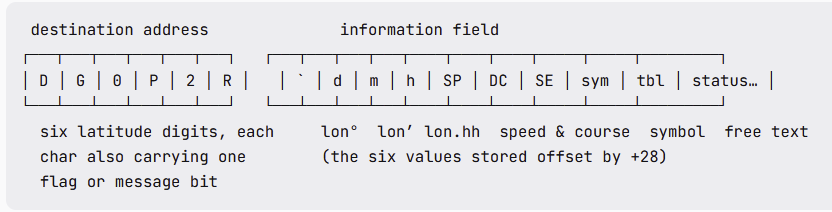
Decoding the destination, character by character, per the APRS 1.2 spec (chapter 10):
| Byte | Char | Latitude digit | Also encodes |
|---|---|---|---|
| 1 | D | 3 | message bit A = 1 (custom set) |
| 2 | G | 6 | message bit B = 1 (custom set) |
| 3 | 0 | 0 | message bit C = 0 |
| 4 | P | 0 | latitude sign: North |
| 5 | 2 | 2 | longitude offset: +0° |
| 6 | R | 2 | longitude sign: West |
The character table works like this: 0-9 mean "this digit, flag bit 0"; A-J mean "this digit, flag bit 1 (custom)"; P-Y mean "this digit, flag bit 1 (standard)" - and in bytes 4-6 the flag bit doubles as North/+100°/West respectively. (K, L, and Z encode the space / position-ambiguity cases.) So DG0P2R unpacks to latitude 36°00.22′ N, message type Custom-1, no longitude offset, western hemisphere.
The longitude, speed, and course live in the first bytes of the information field - ` rG9l ␜-/ - the six encoded values offset by +28 to keep most bytes printable (the type byte and the symbol pair are literal):
`- data type: Mic-E, current GPS fix.r(114): 114 − 28 = 86° W (the +0 offset from the address applies).G(71): 71 − 28 = 43 minutes.9(57): 57 − 28 = 29 hundredths → longitude 86°43.29′ W.l(108): 108 − 28 = 80 → ×10 = 800 in the speed accumulator.- space (32): 32 − 28 = 4 → 0 units of speed, remainder 4 → +400 into the course accumulator.
␜(0x1C, 28): 28 − 28 = 0 → course tens/units 0.- Final adjustments the spec mandates: speed 800 ≥ 800 → subtract 800 = 0 knots; course 400 ≥ 400 → subtract 400 = 0 (course unknown).
-+/- symbol: a house on the primary table.
So the line noise says: a home station at 36°00.22′ N, 86°43.29′ W - the Nashville area, which fits the Tennessee iGate W4CAT-1 that heard it - parked, house icon, followed by free-text status (the operator's local repeater, 442.475+ 88.5 Hz tone) and a radio-appended device suffix.
Now look back at those two bytes in the middle: a space and an unprintable 0x1C, both carrying real position/speed data. Any gateway that trims whitespace, strips control characters, or runs the packet through a text decoder has just silently corrupted a valid position - which is precisely why the iGate rules later in this guide are so insistent about byte-exactness. Mic-E is not an edge case; it is a huge share of all mobile APRS traffic.
NOTE: The frequency and CTCSS tone, in the comment, are not in the standard form so receiving stations will not be able to parse this information.
Step 1 - The RF Hop
The radio keys up on the local APRS channel - 144.390 MHz across much of IARU Region 2 (the Americas), 144.800 MHz across Region 1 (Europe and Africa), and a country-dependent frequency in Region 3, with local exceptions everywhere. The frequencies-by-country guide has the full table. The modulation is 1200 baud Bell 202 AFSK: two audio tones over an ordinary FM voice channel, which is why any handheld with a data port can play.
At this instant the packet exists only as sound in the air over one city. Nobody on the internet knows it happened. Whether it goes any further depends entirely on who is listening.
Step 2 - Digipeaters Spread It Across RF
A digipeater ("digi") is a station that hears an APRS packet and re-transmits it on the same frequency so it reaches farther. This is pure RF - no internet involved - and it is governed by that WIDE1-1,WIDE2-1 path under the modern New-N paradigm.
WIDE1-1 is the slot for fill-in digis (home stations, low sites); WIDE2-1 is for wide-area digis (hilltops, towers). When a nearby fill-in digi called TA1FILL repeats our packet, it processes the WIDE1-1 alias - typically substituting its own callsign and setting the "has-been-repeated" bit, shown as a trailing *:
TA4OHN-9>APDR16,TA1FILL*,WIDE2-1:!4058.12N/02900.34E>Mobile in Istanbul
That * - the TNC2 rendering of the "has-been-repeated" (H-bit) state on the last used address - lets every station on the channel see how far along the path the packet is. A wide digi may then service WIDE2-1 the same way, and the packet's reach grows with each hop:
 TA4OHN-9 (car)         TA1FILL (rooftop)        wide digi (hilltop)
 few watts, low antenna fill-in digi             covers the whole region
      │                       │                        │
      │ ~5 km                 │ repeats once           │ repeats once
      ├──────────────────────>│ WIDE1-1 → TA1FILL*     │
      │                       ├───────────────────────>│ WIDE2-1 consumed
      │                       │                        ├─────> every iGate
      │                       │                        │       in ~50 km hears it
Two things are worth being precise about, because they are widely misunderstood:
- The
*records the path; it does not by itself stop the packet being repeated again. What prevents a digi from repeating the same packet twice is its duplicate-suppression check - a short memory of recently-heard packets (often paired with a "viscous delay") that holds re-transmission when a neighbour has already done the job - while the set H-bits keep already-consumed path slots from being serviced again. - Exactly how the
WIDEn-Nalias is handled - callsign substitution, decrementingN, or preemptive digipeating - varies between digi firmwares. The digipeater guide covers the variants and how to choose a sane path.
The thing to remember here is that digipeating is what carries the packet from the car's little rubber-duck antenna to a station tall enough - and connected enough - to put it on the internet.
Step 3 - The iGate Decides
An iGate (internet gateway) is a station with a radio receiver and an internet connection. When it decodes a packet off the air, it applies a specific set of gating rules - and this is where a lot of implementations already go wrong, because "gate everything" is not quite the rule.
Following AE5PL's IGate criteria, a receive iGate gates a locally-heard packet to APRS-IS except when any of these is true:
- it is not a UI frame (control field ≠
0x03or PID ≠0xF0); - it is a generic query (data type
?); - the header contains
TCPIPorTCPXX- it is already from the internet (a mandatory exclusion, to prevent loops); or it is flaggedNOGATEorRFONLY, which iGates honour by convention (AE5PL's formal criteria treat these two as optional rather than required); - it is a third-party packet whose third-party header contains
TCPIPorTCPXX; - the TNC has
PASSALLenabled (which lets corrupt frames through).
Within that filter, the iGate must not do its own duplicate filtering. It is tempting to think "I already sent that station's position ten seconds ago, I'll drop this one" - but that decision belongs to the servers, which have the global picture. An iGate that drops "duplicates" locally throws away packets that other iGates never heard.
What the iGate does do is transform the framing - an AX.25 UI frame becomes APRS-IS text - and append its own q-construct. It logs into a server with its callsign and passcode, and what must survive that transformation untouched is the information (data) field: every space, every non-ASCII byte, byte-for-byte. (The one deliberate exception is an eligible third-party packet - one beginning with } and not carrying TCPIP/TCPXX - which the iGate unwraps, stripping the outer header and leading }, while preserving the encapsulated data exactly. More on why byte-exactness matters in the mistakes section.)
What If No iGate Hears You?
The most-asked question in all of APRS, and the journey's one hard dependency: everything past this point requires some iGate, somewhere, to have heard the packet.
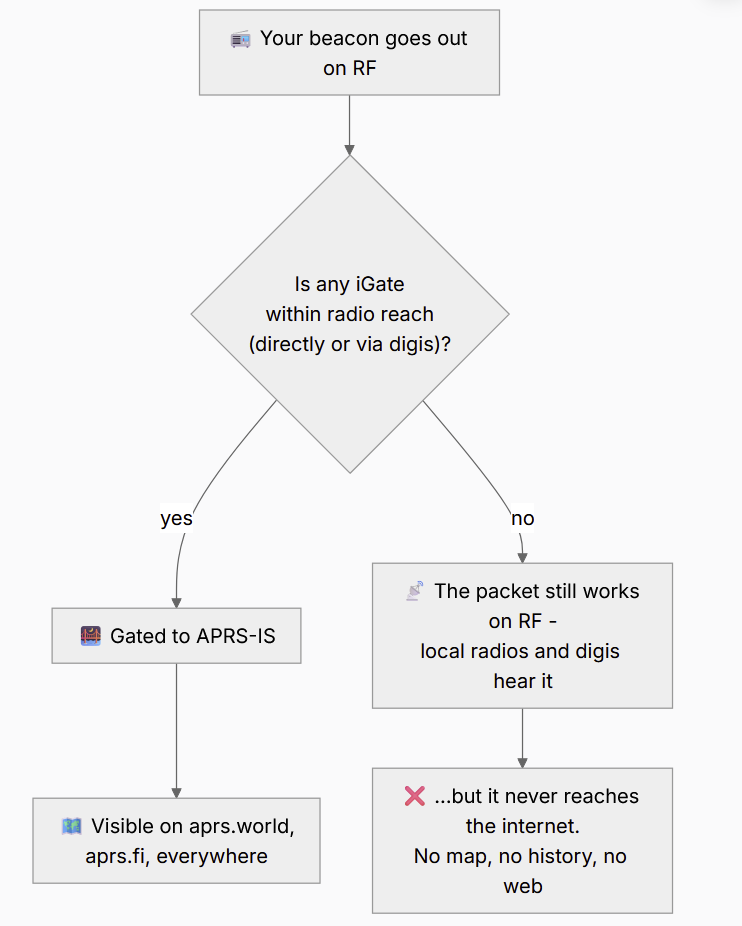
Two truths follow from this, and they answer two perennial questions:
- "Can APRS work without the internet?" Yes - completely. APRS was designed as a pure RF network and still functions as one: local nets, EmComm exercises, and event tracking all run radio-to-radio with zero internet. APRS-IS is a convenience layer bolted on top, not the foundation. A packet that never meets an iGate is not a failed packet - it did its RF job; it just never became a dot on a website.
- "Why doesn't my beacon appear on the map?" Nine times out of ten the answer is in this diagram: no iGate heard you. Wrong frequency for your region, too little power, a poor antenna, terrain, or simply no iGate coverage nearby. The remaining cases are configuration: a
NOGATE/RFONLYpath (you asked not to be gated), a malformed position, or beaconing so rarely that live maps age you out of their "recent" window. The fix for a coverage gap is beautifully self-serving: put up an iGate yourself - a cheap SDR or an ESP32 board is enough, and your whole area's traffic starts reaching the world through you.
Step 4 - Crossing Into APRS-IS: the q-Construct
Our iGate, callsign TA1IGT, uploads the packet. In the process one token is appended to the path - the q-construct:
TA4OHN-9>APDR16,TA1FILL*,WIDE2-1,qAR,TA1IGT:!4058.12N/02900.34E>Mobile in Istanbul
That ,qAR,TA1IGT is new. It is the packet's passport stamp: it records how the packet entered the internet and who let it in. Read it as "gated from RF (qAR) by iGate TA1IGT". A receive-only iGate - one that never transmits - would stamp qAO here instead; the difference is whether the iGate can also gate messages back down to RF.
q-constructs exist for provenance (where did this packet come from?) and to help with loop prevention across the server mesh. The full algorithm is defined by Pete Loveall, AE5PL, at aprs-is.net/q.aspx - the authoritative source, worth reading in full before you implement anything that touches APRS-IS. The ones you will actually encounter:
| q-construct | Added by | Meaning | The identifier after it is… |
|---|---|---|---|
qAR | iGate | Gated from RF by an iGate that can gate messages to that station | the iGate |
qAO | iGate / server | From RF via an iGate that will not gate messages to that station (receive-only, or unable to reach it); also applied server-side to certain non-gated send-only / client-port packets | the iGate (server-side, the server or client login) |
qAC | server | A verified client injected the packet directly over a bidirectional connection | the server |
qAX | server | An unverified login injected it directly (deprecated on APRS-IS) | the server |
qAU | server | Received directly from a client over UDP | the server |
qAS | server | Arrived from another server with no q-construct, or generated here | the login/IP-derived id of the first identifiable server |
qAr | server | Reached this server indirectly, from a remote iGate that used the ,I construct | the remote iGate |
qAo | server | Generated on a client-only port where FROMCALL differs from the login and the packet's ,I/qAR gate identifier matches the login | the iGate |
qAI | client / server | A trace packet; each server it passes appends its own identifier | the trace chain - the originator (or entry identifier) first, then each server |
qAZ | any | A command packet that must not be propagated | the originator |
Three practical takeaways. First, qAR and qAC are the two you'll see constantly: qAR is "came off the air via an iGate", qAC is "a verified station connected straight to a server and injected its own packet" (its own beacon, a weather feed, a piece of software). They are not interchangeable, and a common write-up error is to call qAC "server-generated content" - it is not; it marks a verified direct client. Second, the identifier after the construct is not always the sender: for qAR/qAO it is the iGate, and for qAC/qAU it is the server. Third, there is a legacy form you will still see - the ,I construct - where an older iGate appended ,IGATECALL,I; the receiving server converts that into a qAR, qAr, or qAo depending on how it arrived.
Step 5 - Through the Server Network
Once our packet lands on a server, it propagates through APRS-IS. The network is not a single flat ring of a dozen equal peers: there are core servers and a larger set of Tier 2 servers, connected by configured upstream and peer links, and packets flow through those links rather than being blasted to literally every server at once. The APRS-IS network guide covers the server software (mostly aprsc), the ports, and the filter language in depth. Two points matter for our packet's journey.
Duplicate detection. This is the heart of the network's sanity, and it is precise. APRS-IS considers two packets duplicates when they match on:
- the source call and SSID,
- the destination call (SSID ignored),
- the data length and data content,
with the digipeater path ignored entirely, over a 30-second sliding window. The comparison is case-sensitive. This is why our packet, arriving at two different servers via two different iGates with two different paths, collapses to one: the path differs but the source, destination, and data are identical. It is also exactly why an iGate that alters the data - even by trimming one trailing space - is so destructive: the altered copy no longer matches, sails through the filter, and both versions live on.
Filtered clients don't get everything. A client on the filtered user port (14580) receives only the packets matching the filter it requested - a viewport radius, a callsign list, a packet-type set. The full firehose exists, but you subscribe to a slice of it. So "the packet is now on APRS-IS" means "any client whose filter matches can now receive it", not "it was pushed to every listener".
Under normal conditions the trip from "TA1IGT uploads in Istanbul" to "a matching client in Tokyo receives it" is on the order of a second - but that figure is illustrative, not a guarantee: server load, link topology, RF contention, and the client's own processing all move it around.
The ports, briefly
- 14580 (TCP) - the filtered user port. Log in, send a filter, receive the matching subset. This is what almost every visualizer connects to. (The feed starts with message packets; filters are additive from there.)
- 10152 (TCP) - a full feed port. Everything, unfiltered - for research, archiving, or a server's own upstream.
- 23000 (TCP) - TCP login/control that returns the full feed to a UDP port the client specifies.
- 14501 (HTTP) - primarily the server's HTTP status page (some servers also expose WebSocket or UDP services here), not a bidirectional data port.
Step 6 - Out to the World, and Sometimes Back to RF
From the server network, the packet reaches everything that subscribes:
- Web visualizers. aprs.world connects to a server, applies a viewport filter, stores the packet in Postgres/TimescaleDB, de-duplicates and geo-indexes it, and pushes it to your browser over a WebSocket. aprs.fi does the equivalent. Within a second or two of
TA4OHN-9keying up in Istanbul, the car can be moving on screens worldwide. - Mobile apps and dashboards. Same feed, different front end.
- Transmit iGates. A TX-capable iGate elsewhere may put selected APRS-IS traffic back onto RF - chiefly messages (and the sender's next position packet, so the recipient can place them), and only when the timing rules are satisfied: the recipient was heard locally on RF recently, the recipient was not recently heard via APRS-IS, the sender was not recently heard on RF, and the sender's header carries no
TCPXX/NOGATE/RFONLY. Crucially, anything gated to RF must be wrapped in third-party format, e.g.IGATECALL>APRS,GATEPATH:}FROMCALL>TOCALL,TCPIP,IGATECALL*:<data>. Two absolute rules: q-constructs must never appear on RF, and the,Iconstruct must never appear on RF.
That is the full circuit: RF → digipeaters → iGate → q-construct → server network → clients (→ selectively back to RF). One packet, a handful of hops, roughly a second or two end to end when the network is healthy.
Listen for Yourself
Everything above is verifiable from any terminal, right now, with no software beyond nc (netcat). APRS-IS is plain text over TCP, and a receive-only session needs no credentials at all - the documented convention is passcode -1. Connect to the filtered port and send one login line:
$ nc rotate.aprs2.net 14580
# aprsc 2.1.20-gdaa359f
user N0CALL pass -1 vers my-experiment 0.1 filter r/41.0/29.0/250
# logresp N0CALL unverified, server T2SYDNEY
TA1DX-9>APE32A,WIDE1-1,WIDE2-1,qAS,TA1DX-1:!4100.49N\02830.09E>000/000/A=000041
TA1GRH-10>APE32T,TCPIP*,qAC,APRSTH:!4101.75N/02847.35E&PHG1060
TA2KZY-11>APDW14,TCPIP*,qAC,T2GB:!4047.77NR03025.59E&Op.Ugur 145.500 QRV
The login line is the whole protocol handshake: user <call> pass <passcode> vers <software> <version>, optionally followed by a filter - here, everything within 250 km of Istanbul. With passcode -1 the server answers unverified: you can listen but nothing you send will be accepted. To inject packets you would log in with the passcode derived from your callsign, as every iGate does.
That transcript is a real session from writing this guide, and it holds three small lessons:
- The DNS pool is real. We asked for
rotate.aprs2.netfrom Istanbul and were handedT2SYDNEY- a server in Australia. The rotation hands out whichever pool member it hands out; your packets typically reach the whole network within about a second anyway. (For a production iGate you would still prefer a regional pool, and resolve it fresh each connection.) - Provenance is readable at a glance.
TA1DX-9's path (WIDE1-1,WIDE2-1,…,TA1DX-1) tells an RF story - digi aliases, then an entry stamped withTA1DX-1. (Strictly, onlyqAR/qAOformally assert an RF crossing; aqASstamp marks where the packet entered without proving how it was heard.)TA1GRH-10's path (TCPIP*,qAC,APRSTH) shows this copy was injected directly into a server by a verified client - it never crossed an iGate, whatever the station may also do on RF. After Step 4, you can read this the way a customs officer reads passport stamps. - The feed is the ground truth. Every map, app, and dashboard downstream - aprs.world included - is a view over exactly these lines of text. If you ever doubt what a visualizer shows you, this is the primary source, one
ncaway.
Watch the feed for a few minutes and you will see everything from this guide scroll past: qAR and qAC stamps, digi paths with consumed hops, Mic-E line noise, weather blocks, telemetry - the entire journey, live.
Messages, Not Just Positions
Most people meet APRS as "the thing that puts my car on a map" - but the same road carries two-way text messages between stations, and the delivery dance uses everything this guide has covered. TA4OHN-9 messaging a friend across town looks like this:
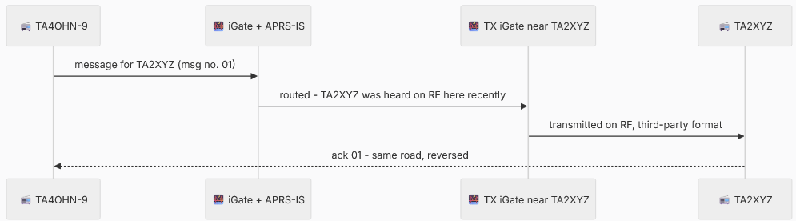
The sender numbers each message and retries until an ack comes back (or it gives up); the TX iGate only fires because the recipient was recently heard on its RF side - the timing rules from Step 6. No ack usually means the recipient's radio is off, out of any TX iGate's coverage, or the reply path failed - which is the honest answer to "why do APRS messages fail?". The message protocol guide walks the acks, retries, and pitfalls in detail.
When a Packet Leaves the Ham World - SMS, Email, and Bots
Once you understand that an APRS message (data type :) is just an addressed line of text riding the same road, a whole family of services makes sense: park a well-known callsign on APRS-IS, have it read messages addressed to it, and let it do things - send an email, relay an SMS, answer with a weather forecast. From a handheld in the middle of nowhere, with no phone coverage, you can reach the outside world through any iGate that hears you.
The pattern is always the same - a normal APRS message to a service callsign, with the "command" in the message text:
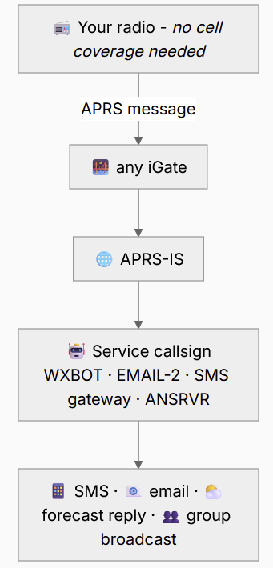
The classics, with their documented message formats:
- Weather by message -
WXBOT. SendWXBOTa message likeBoston,MA Saturday fullorKJFK metar- or any message shorter than three characters for a brief forecast at your last beaconed position - and it answers with a National Weather Service forecast as APRS messages. Location can be a callsign, city/state, ZIP, grid square, or airport code. - Email -
EMAIL-2. A message toEMAIL-2whose text starts with an address -[email protected] Made it to the summit, all OK- is relayed to the internet as an email. One line, 67 characters of payload, but from a mountaintop that is plenty. - SMS - the gateway pattern. The long-running
SMSGTEservice established the syntax - message text@15551234567 running late, home by 8sends an SMS, and the phone's reply routes back to your callsign as an APRS message. The original service has since shut down over SMS-spam regulations; the current successor by NA7Q listens asSMSand requires the phone's owner to opt in first. Gateways come and go - check the current one's docs before relying on it - but the message-to-a-service-callsign pattern is the standard. - Group check-ins -
ANSRVR. A message ofCQ HOTG Greetings from IstanbultoANSRVRre-broadcasts your text to every subscriber of theHOTGgroup - this is the machinery behind the worldwide #APRSThursday net (we run a one-tap check-in for it), and ANSRVR confirms with a terseN:HOTG 12 Messages Sent. - Winlink notices -
WLNK-1. The Winlink radio-email system speaks APRS too: message commands toWLNK-1let you list and read your Winlink mail from an APRS radio.
Two honest caveats. These services live on the internet side, so your message still needs to reach an iGate over RF - no iGate in range, no magic. And there is no official WhatsApp/Telegram bridge; SMS and email are the canonical exits to the non-ham world. (Messages, ACKs, and retries have their own protocol layer - the message protocol guide covers it.)
Why So Many iGates Are Broken
Here is the uncomfortable part. A large share of the "duplicate" noise on APRS-IS comes not from RF conditions but from defective iGate software. The practical do's and don'ts are scattered - the best single source is the IGATE-HINTS notes in the aprsc project, alongside AE5PL's server and iGate design pages - so here they are collected, as the mistakes to avoid.
1. Altering the data portion. The single worst offence, and it follows directly from the 30-second dedup rule above: dedup keys on the exact data bytes. The moment an iGate strips a trailing space, "cleans up" a character, or re-encodes the packet, it produces data that no longer matches the original, dedup can't collapse the two, and the network carries both. Pass the information field exactly as received - the only legitimate change is unwrapping an eligible third-party packet, and even then the encapsulated data is preserved byte-for-byte.
2. Truncating at a NUL byte. The AX.25 payloads an iGate handles are binary - a NUL byte should not appear in a well-formed APRS packet, but frames containing one do occur on the air, and gateway code must pass them through, not truncate. C-string functions (strcpy, strlen) stop dead at the first NUL, silently chopping the frame. Use binary-safe operations (memcpy, memchr) end to end.
3. UTF-8 decoding the whole packet. APRS is a byte protocol, not a text protocol. Decode UTF-8 only in the specific display fields where it belongs (a comment, a message body) - never across the whole frame, or you will corrupt Mic-E and other binary information-field bytes.
4. Doing your own duplicate filtering on receive. A receive iGate gates every eligible packet and lets the servers dedup. Local "I already saw that" filtering discards packets other iGates never heard. And on the server side, dedup must follow the documented field comparison - not a short 16-bit CRC, whose collision rate drops legitimate, distinct packets as false duplicates.
5. Caching a single DNS result. rotate.aprs2.net is a rotating pool. An iGate that resolves it once at startup and pins that IP forever defeats the load balancing and can hammer one server. Resolve fresh on each connection.
6. Opening multiple concurrent connections. One iGate should hold one connection. Multiple connections from the same station create loops and delayed duplicate bursts, and make the iGate's behaviour hard to reason about. (They are not, by themselves, why a station "teleports" on a map - identical copies are deduped server-side; teleporting is usually a data or GPS problem - but multiple connections are still wrong.)
7. Buffering during an outage and replaying later. When the internet link drops, discard the packets you can't gate right now. An iGate that queues them and floods them onto APRS-IS when the link returns injects a burst of stale positions - every one an out-of-date fix arriving long after the 30-second window that would have caught it.
None of these are exotic. They are ordinary programming shortcuts - reusing a C-string helper, caching a lookup, adding a "helpful" dedup - that happen to be exactly wrong for a byte-exact, best-effort, globally-replicated network. An iGate that forwards every eligible packet with its data untouched, over one connection, honouring the gating criteria, is already better than a large share of what's deployed.
Seeing It on aprs.world
Everything in this guide is visible, live, on the very site you are reading it. The path from theory to pixels:
- Open the live map - every dot is a station whose packet completed the journey above within the last minutes.
- Search any callsign from this guide (try one you saw in the Packet Zoo) or click a marker near you.
- On the station page, the packet list shows each beacon as it arrived - position, timestamp, and the station's track over time.
- Open a packet's raw view: there it is - the same
SOURCE>TOCALL,path,qAR,IGATE:payloadline this guide taught you to read, with the q-construct telling you exactly which iGate lifted it off the air. - Drop that raw line into the APRS Packet Decoder to see every field decoded and named - and press Transmit there to watch a packet make the whole journey end to end.
Reading a raw packet on a website and knowing what every byte means, who repeated it, and which volunteer's antenna caught it - that is the moment this network stops being magic and becomes machinery you understand.
Common Questions
What is an iGate? A station that runs a radio receiver and an internet connection, forwarding eligible packets it hears on RF up to APRS-IS (and, if transmit-capable, selected messages back down). It is the single seam joining the two networks - Steps 3-4 of this guide. Build one with the iGate setup guide.
What is a digipeater, and how is it different? A digipeater repeats packets on the same RF frequency to extend radio range; it never touches the internet. An iGate bridges to the internet; a digipeater stretches the radio side. Many real stations do both. Details in the digipeater guide.
RF vs APRS-IS - which is the "real" APRS? RF is the foundation and works stand-alone; APRS-IS is the internet overlay that makes the network globally visible. Neither replaces the other: RF gives license-free-infrastructure resilience, APRS-IS gives reach, history, and maps.
Can APRS work without the internet? Yes - see What If No iGate Hears You? above. Radio-to-radio APRS (positions, objects, messages) needs no internet at all; that independence is why EmComm groups drill with it.
Why doesn't my beacon appear on the map? Almost always: no iGate heard you (coverage, frequency, power, terrain) - or you asked not to be gated (NOGATE/RFONLY). The full checklist is in the no-iGate section above.
Why do APRS messages fail? Delivery needs a TX iGate that has recently heard the recipient on RF - if their radio is off or out of coverage, there is nothing to fire, no ack returns, and the sender's retries run dry. The message protocol guide covers acks and retries in depth.
The Whole Journey, in One View
Further Reading
- Q-construct reference (aprs-is.net/q.aspx) - the authoritative definitions, by AE5PL.
- IGate design & criteria and Server design - the gating and dedup rules, from the source.
- aprsc IGATE-HINTS - the practical correctness notes, in one place.
- APRS-IS Network Explained - servers, ports, and the filter language.
- Setting Up an iGate - how to run the box in Step 3 yourself.
- Digipeaters Explained - the New-N paradigm and choosing a path.
- The AX.25 Protocol - the frame our packet actually is.
A packet's trip from a rubber-duck antenna to a browser tab crosses two entirely different networks - one made of radio and volunteers with antennas, the other made of TCP and volunteers with servers - joined by a single box making a single, rule-bound decision. Understand that seam, the iGate and its q-construct, and the rest of APRS-IS stops being a fog and starts being a system.
Related guides
- APRS-IS Network Explained — Tier 2 Servers, Filters, and How Packets Propagate WorldwideThe architecture of the APRS-IS internet backbone — aprsc servers, Tier 2 rings, filter syntax (r/, t/, b/), and how a packet propagates from a local iGate to every visualizer worldwide.
- APRS iGate Setup — How to Run an Internet Gateway with Direwolf or aprxWhat an APRS iGate does, the difference between RX-only and RX/TX iGates, and a practical overview of building one with Direwolf, aprx, or a Raspberry Pi soft-TNC.
- APRS Digipeater Explained — Paths, WIDE1-1, WIDE2-1, and the New N ParadigmWhat an APRS digipeater is, how the WIDE1-1 / WIDE2-1 path works, the New N Paradigm, and the difference between fill-in digis and wide-area digis.
- AX.25 Protocol Explained — Frame Format, SSID, Control Bytes, and How APRS Sits on TopA technical deep-dive into the AX.25 link-layer protocol used by APRS: frame structure, address encoding, the SSID field, control byte, info field, FCS, and why APRS chose UI frames.
Original location: https://aprs.world/guides/how-aprs-packets-travel-rf-to-aprs-is